Helping people manage retirement investments on the go

Overview

In 2019, Prudential realized the need to bring a richer mobile experience for their retirement product offerings as an upgrade to their outdated desktop web experience.

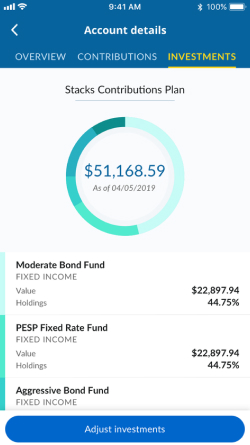
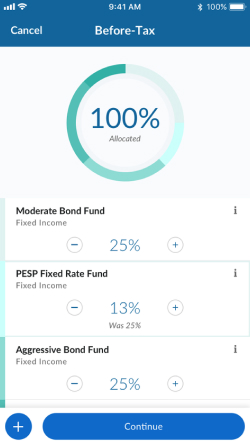
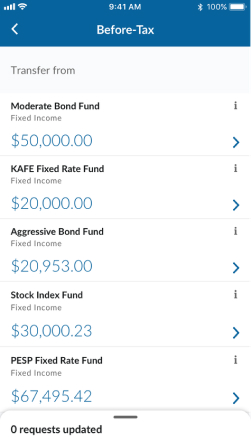
Prudential initially launched their mobile app with Contributions as research showed contributing to a 401k was a major activity for users. The next goal was to add more features and improve financial wellness by adding Investment Allocations and Transfers.

Prudential investments tabPrudential investment allocationsPrudential fund transfer

Duration

6 months

My role

Design lead

Impact

  • +3.5% App Store rating improvement
  • +2% increase in downloads
  • +3% increase in daily average visits
01

Design Sprint

Validating ideas and assumptions together

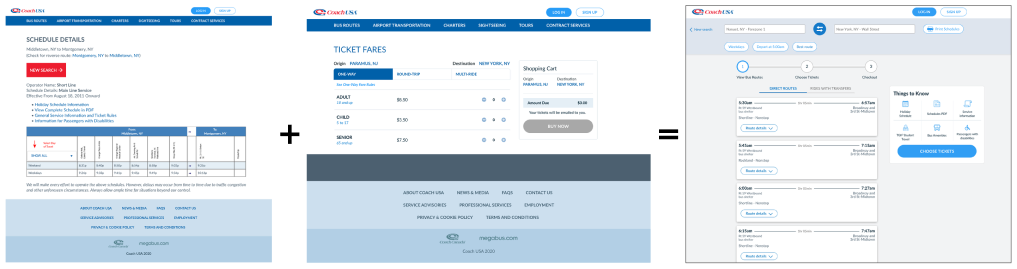
At Prudential, we started initiatives with design sprints to validate our ideas and assumptions. We held a few working sessions and gathered customer research before the sprint week.

We concluded the sprint with a working prototype and specific next steps. We held further working sessions to build out the rest of the experience.


Design sprint process
02

Design
Question

How might we streamline updating various investment activities and ensure safety and privacy?

03

Execution
Mode

Extending the happy path into a complete product

With the happy paths mapped out, we still needed to create all of the edge cases and nuances that we couldn't fit into the design sprint. It took many months of iterating, vetting the designs with the retirement team, legal team and compliance.

The biggest and most complex challenge was figuring out how to include all the mandatory messages we needed to show the users as they allocated to different funds and transferred funds between accounts. This required the team to develop several iterations on a messaging system.

04

Investment
Allocations

Investment allocations key interactions

Investments tab
Investment options
Adjust or add or remove allocations
Review changes before confirming
Confirmation of changes
05

Transfers

Transfers key interactions

To make a transfer, the user would select the from fund and one or more to funds and adjust the percentages. They would be able to review their changes before submitting and then receive a confirmation.

Investments tab
Investment options
Select which fund to transfer from
Make changes to equal 100%
Confirmation of changes
06

App Launch &
Results

We successfully launched both features: Investment Allocations in November 2019 and Transfers in January 2020. With managing such complexity and many moving parts, it was incredible we were able to successfully launch and provide much desired functionality to our customer base on the go. Below illustrates the impact our efforts and hard work.

+3.5%
Rating improvement on the iOS App store from 1.4 rating
+2%
Increase in downloads (now at 373k)
+3%
Increase in daily average visits
07

Retrospective

What I would've done differently

  • Define expectations and the role more clearly to avoid unexpected scope creep
  • Allow for more time to conduct deeper user research to better guide design decisions